
AdsCrawl vs axiom.ai vs Selenium: Which Browser Automation Tool Wins?
Compare AdsCrawl, axiom.ai, and Selenium for browser automation, scraping, and AI agents. See which API, no-code bot, or framework fits your workflow.
AdsCrawl vs axiom.ai vs Selenium: Which Browser Automation Tool Fits Your Workflow?
Browser automation has splintered into three distinct approaches: developer-first APIs, no-code bot builders, and open-source frameworks. AdsCrawl, axiom.ai, and Selenium each represent one of these paths, and choosing the wrong one can cost you weeks of engineering time or lock you into a tool that cannot scale.
This comparison breaks down how each tool works, where it excels, and which workflows it serves best. You will learn the practical differences in setup, browser control, scaling, and pricing so you can make a decision based on your actual requirements rather than marketing claims.
Quick Verdict: Which Tool Should You Choose?
Selenium product interface.
- Choose AdsCrawl if you are building AI agents, monitoring systems, or data pipelines that need a unified API for screenshots, HTML extraction, and remote Chrome DevTools Protocol (CDP) control with concurrent cloud sessions.
- Choose axiom.ai if you are a non-technical user or a team that wants to automate browser tasks with a visual builder, natural language descriptions, or prebuilt integrations without managing infrastructure.
- Choose Selenium if you need a free, open-source framework for in-house test automation, have engineering resources to maintain it, and do not mind handling browsers, drivers, and infrastructure yourself.
What Each Tool Actually Is
Selenium product interface.
AdsCrawl: Browser Infrastructure as an API
AdsCrawl provides real browser capabilities through a unified API. Instead of installing browsers or managing WebDriver binaries, you send requests to cloud browser sessions that can capture screenshots, extract HTML and Markdown, and expose remote CDP endpoints for fine-grained control.
The platform is designed for AI agents, monitoring, SEO, and automation workflows. Teams use it to collect public web pages at scale, validate page rendering states, and wrap repeatable browser actions into reliable APIs. With dashboards for key management, usage tracking, and debugging, it integrates quickly via cURL, Node.js, and Python examples.
AdsCrawl positions itself as browser infrastructure for the AI era, serving cross-border commerce, growth, data, and AI application scenarios. Its credit-based usage model includes a freemium tier, making it accessible for experimentation before committing to paid usage.
axiom.ai: Browser Automation for Humans and AI
axiom.ai is a browser automation platform that serves over 300,000 users, from non-technical professionals to developers. Its core promise is flexibility in how you build automations: no-code, code, or by describing requirements to Claude.
The platform offers a no-code Chrome Extension with a visual step builder, a code-based environment with an SDK for custom scripts, and an AI-driven mode that generates automations from natural language. Bots can run on axiom's cloud infrastructure or locally on the user's machine.
Key features include a rich library of prebuilt steps, CAPTCHA solving, webhooks, custom JavaScript execution, and deep integrations with services like Google Sheets, Microsoft Excel, Make, n8n, and various AI models including Claude, Gemini, and DeepSeek. With over 800,000 bots executed and 12.5 million hours of runtime, axiom.ai has demonstrated scale and reliability across a large user base. The company is backed by Y Combinator.
Selenium: The Open-Source Automation Framework
Selenium is an open-source suite of tools for automating web browsers, primarily used for testing web applications but also capable of automating repetitive web-based administration tasks. It has been actively developed since 2004, making it one of the oldest and most established browser automation projects.
The suite consists of three main components:
- Selenium WebDriver: Language-specific bindings that drive browsers natively for robust regression automation.
- Selenium IDE: A browser add-on for Chrome, Firefox, and Edge that enables simple record-and-playback of interactions for quick bug reproduction and exploratory testing.
- Selenium Grid: Allows scaling by distributing tests across multiple machines and environments.
Selenium supports multiple programming languages including Java, C#, Python, Ruby, and JavaScript, and integrates with various testing frameworks. The project is governed by a community-driven structure with a Project Leadership Committee and Technical Leadership Committee, supported by sponsors and a large ecosystem of third-party drivers, bindings, plugins, and frameworks.
Head-to-Head Comparison
Selenium product interface.
Setup and Time to First Automation
Selenium requires the most upfront work. You need to install language bindings, download browser drivers, manage driver-browser version compatibility, and write boilerplate code before your first automation runs. For experienced developers, this is familiar territory, but it is real engineering overhead.
axiom.ai offers the fastest path for non-developers. Install the Chrome Extension, open the visual step builder, and you can record or assemble a working bot in minutes. The natural language mode with Claude further lowers the barrier: describe what you want, and axiom generates the automation.
AdsCrawl sits between these extremes but leans developer-friendly. You create an API key and send your first request within minutes using cURL, Node.js, or Python examples. There is no browser installation, driver management, or infrastructure provisioning. For teams that already know how to call APIs, this is the fastest path to production browser automation. If you are new to the platform, the AdsCrawl setup guide walks through creating an API key and sending your first screenshot and HTML request.
Browser Control and Flexibility
Selenium provides the deepest programmatic control through WebDriver's language bindings. You can manipulate every element, execute JavaScript, handle alerts, and manage cookies. This control comes with responsibility: you write and maintain all the logic yourself.
axiom.ai abstracts browser control into prebuilt steps and visual workflows. You can add custom JavaScript for advanced cases, and the SDK allows code-based automation when the visual builder is insufficient. The platform handles browser lifecycle, retries, and scheduling for you.
AdsCrawl offers a unique middle ground: high-level API endpoints for common tasks like screenshots and HTML extraction, plus remote CDP sessions for developers who need direct browser control. This dual approach means you can start with simple API calls and graduate to fine-grained CDP commands without switching tools.
Scaling and Infrastructure
Selenium scales through Selenium Grid, which distributes tests across multiple machines. However, you are responsible for provisioning, maintaining, and scaling that infrastructure. For large-scale scraping or monitoring, this becomes a significant operational burden.
axiom.ai runs bots on its cloud infrastructure or locally on your machine. Cloud execution removes infrastructure concerns, and the platform has demonstrated scale with 12.5 million hours of runtime. Scheduled bots, webhooks, and integrations make it suitable for ongoing automation workloads.
AdsCrawl provides concurrent browser execution through cloud browser sessions with fingerprint profiles. This is purpose-built for scale: you can run multiple browser sessions in parallel without managing any infrastructure. The credit-based model means you pay for what you use, and the dashboard gives you visibility into usage and debugging.
AI and Automation Workflows
axiom.ai has the most mature AI integration for end users. You can describe an automation to Claude and get a working bot, use AI models for data extraction and decision-making within workflows, and connect to ChatGPT and other AI services. This makes axiom.ai particularly strong for teams that want AI-assisted automation without building custom infrastructure.
AdsCrawl is built specifically for AI agents and AI-era workflows. The unified API provides the browser capabilities that AI systems need: screenshots for visual understanding, HTML and Markdown extraction for text processing, and CDP control for interactive actions. If you are building an AI agent that needs to browse the web, AdsCrawl provides the browser layer without requiring you to manage it.
Selenium has no built-in AI features. You can integrate AI models through custom code, but the framework itself is purely mechanical. This is not a weakness for testing use cases, but it means AI-driven automation requires additional engineering.
Pricing and Cost Structure
Selenium is free and open-source. The cost is in engineering time, infrastructure, and maintenance. For large teams with dedicated automation engineers, this can be the most cost-effective option. For small teams or solo developers, the hidden costs can be substantial.
axiom.ai offers a free tier to install and start, with paid plans for cloud execution, scheduling, and advanced features. The pricing model is subscription-based, which makes costs predictable for ongoing automation workloads.
AdsCrawl uses a credit-based usage model with a freemium tier. You pay for actual browser usage rather than a flat subscription, which can be more cost-effective for variable workloads. The AdsCrawl review provides a hands-on look at pricing and real-world performance.
Ecosystem and Integrations
Selenium has the largest ecosystem of any browser automation tool. Decades of development have produced bindings for every major language, integrations with every testing framework, and a vast community of contributors. If you encounter a problem, someone has likely solved it before.
axiom.ai focuses on workflow integrations rather than testing frameworks. Native connections to Google Sheets, Microsoft Excel, Zapier, Make, n8n, and AI models make it easy to slot browser automation into existing business processes. The prebuilt step library covers common automation patterns without custom code.
AdsCrawl integrates through its API and CDP endpoints. Any tool that can speak HTTP or CDP can work with AdsCrawl, which makes it flexible for custom stacks. The focus is on providing reliable browser infrastructure rather than prebuilt workflow connectors.
Decision Guide: Matching Tools to Use Cases
Choose AdsCrawl When:
- You are building AI agents that need browser capabilities as a service.
- You need concurrent cloud browser sessions with fingerprint profiles.
- You want a unified API for screenshots, HTML extraction, and CDP control.
- Your team prefers API-first development with cURL, Node.js, or Python.
- You need usage tracking and debugging dashboards for browser automation at scale.
- You want to wrap repeatable web actions into reliable APIs without managing infrastructure.
Choose axiom.ai When:
- You are a non-technical user who wants to automate browser tasks without coding.
- You want to describe automations in natural language and have Claude build them.
- You need deep integrations with Google Sheets, Excel, Zapier, or n8n.
- You want prebuilt steps for common tasks like form filling, data extraction, and monitoring.
- You prefer a subscription model with predictable costs.
- You want to run automations locally or in the cloud without managing infrastructure.
Choose Selenium When:
- You are building a test automation suite for web applications.
- You have engineering resources to maintain browsers, drivers, and infrastructure.
- You need support for multiple programming languages and testing frameworks.
- You want complete control over browser behavior without abstraction layers.
- You need a free, open-source solution with a massive community.
- You are comfortable with the operational overhead of managing your own automation stack.
Practical Examples
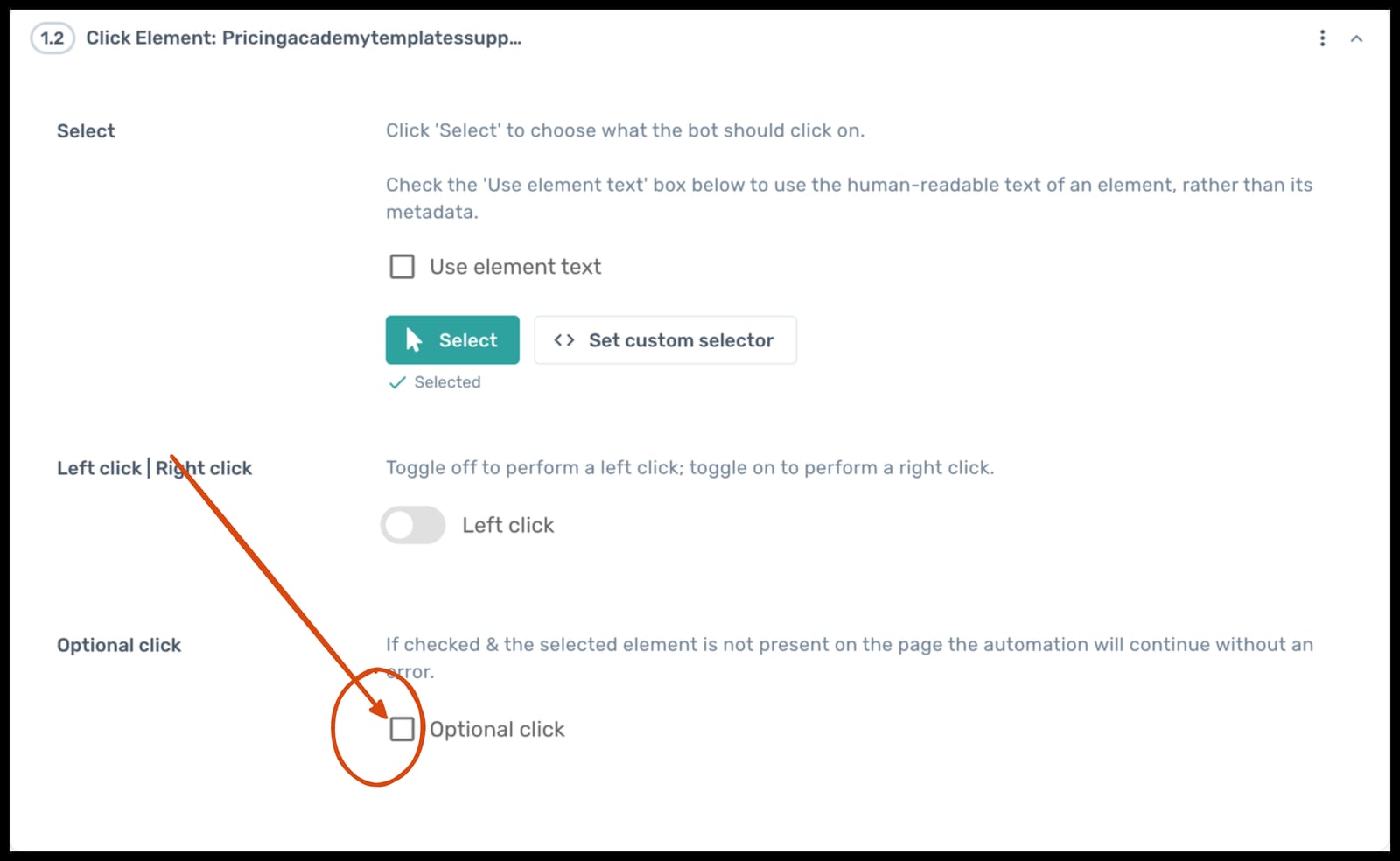
Instead of throwing an error, axiom will click the element if present, and continue if not..
Example 1: Monitoring a Competitor's Pricing Page
With AdsCrawl: Write a Python script that calls the AdsCrawl API to capture a screenshot and extract HTML from the pricing page every hour. Store the results in your database and diff the extracted data to detect changes. No browser installation, no driver management, no infrastructure.
With axiom.ai: Use the visual builder to create a bot that navigates to the pricing page, extracts the price elements, and writes them to Google Sheets. Schedule the bot to run hourly in axiom's cloud. No code required.
With Selenium: Write a Python script using Selenium WebDriver that launches a headless Chrome browser, navigates to the pricing page, extracts the price elements, and stores the results. Deploy the script on a server with Chrome installed, and set up a cron job to run it hourly. You are responsible for keeping Chrome and the driver updated.
Example 2: Building an AI Agent That Browses the Web
With AdsCrawl: Your AI agent sends requests to the AdsCrawl API to capture screenshots for visual understanding, extract HTML and Markdown for text processing, and use CDP sessions for interactive actions like clicking and form filling. The agent orchestrates these calls through the unified API, and AdsCrawl handles browser lifecycle and concurrency.
With axiom.ai: You describe the automation to Claude, and axiom generates a bot that performs the required browser actions. The bot can integrate with AI models for data extraction and decision-making. This works well for defined workflows but may be less flexible for open-ended agent behavior.
With Selenium: You build a custom browser layer using WebDriver, wrapping it in an API that your AI agent can call. This gives you complete control but requires significant engineering to handle browser lifecycle, concurrency, error recovery, and scaling.
Example 3: Automating a Multi-Step Data Entry Workflow
With axiom.ai: Use the visual builder to create a bot that reads rows from a CSV file, fills out a signup form for each row, and handles errors with conditional logic. Run the bot in axiom's cloud or locally. This is axiom.ai's sweet spot: complex multi-step workflows with branching logic and integrations.
With AdsCrawl: Write a script that uses the AdsCrawl API to control a cloud browser session, fill out the form fields, and submit. Use CDP commands for fine-grained control when needed. This works well if you are already building a data pipeline and want browser automation as part of it.
With Selenium: Write a script using WebDriver that reads the CSV, fills out the form, and handles errors with try-catch blocks. Deploy it on your own infrastructure. This is straightforward for developers but requires more code than the other options.
When to Combine Tools
These tools are not mutually exclusive. Many teams use them together:
- Selenium for testing + AdsCrawl for production scraping: Use Selenium for in-house test automation where you need full control, and AdsCrawl for production data collection where you need reliable cloud infrastructure.
- axiom.ai for business users + AdsCrawl for engineering teams: Let non-technical teams build automations in axiom.ai while engineering teams use AdsCrawl for API-driven browser infrastructure.
- Selenium for local development + axiom.ai for scheduled production runs: Develop and debug automations locally with Selenium, then deploy them to axiom.ai's cloud for scheduled execution.
The right choice depends on who is building the automation, what they are building, and how it needs to run in production. For a deeper comparison with other tools, see AdsCrawl vs axiom.ai vs Playwright and AdsCrawl vs ScrapingBee vs axiom.ai.
Related reading
- AdsCrawl Login: Access Your Browser Automation API Dashboard - Learn how to sign in to AdsCrawl, manage API keys, track usage, and troubleshoot common login issues for browser automation workflows.
- AdsCrawl Download: Browser Automation API Setup Guide - Learn how to download, install, and start using AdsCrawl for browser automation, HTML extraction, screenshots, and CDP control. Setup guide with code examples.
Sources and further reading
- Alternatives to Selenium - Selenium is the grandaddy of browser automation, but it's no longer the only game in town.
- No-code Browser automation : r/webscraping - Reddit - Dec 10, 2023 ... Comments Section · browser automation: goto(or open)/click/input/selection/scroll/hover · control flow: ifelse/for/while etc · data extraction: ID/ ...
Frequently Asked Questions
Is AdsCrawl a replacement for Selenium?
Not exactly. AdsCrawl replaces the infrastructure and browser management layer that Selenium requires, but it serves a different primary purpose. Selenium is a testing framework; AdsCrawl is browser infrastructure for AI agents, monitoring, and data collection. Teams that need test automation may still use Selenium, while teams that need API-driven browser automation may prefer AdsCrawl.
Can axiom.ai replace Selenium for testing?
axiom.ai is not designed as a testing framework. While you can use it to automate browser interactions, it lacks the assertion libraries, test runners, and CI/CD integrations that Selenium provides through its ecosystem. axiom.ai is better suited for business process automation, data extraction, and workflow automation.
Which tool is best for non-programmers?
axiom.ai is the clear winner for non-programmers. Its visual step builder, natural language automation with Claude, and prebuilt integrations make browser automation accessible without coding. Selenium requires programming skills, and AdsCrawl is designed for developers who work with APIs.
Which tool is best for AI agents?
AdsCrawl is purpose-built for AI agents, providing screenshots, HTML and Markdown extraction, and CDP control through a unified API. axiom.ai offers AI-assisted automation through Claude and AI model integrations, which works well for defined workflows. Selenium has no built-in AI capabilities.
How do the costs compare?
Selenium is free but has hidden costs in engineering time and infrastructure. axiom.ai uses a subscription model with a free tier. AdsCrawl uses credit-based usage with a freemium tier. The most cost-effective option depends on your usage patterns: high-volume variable workloads may favor AdsCrawl's usage-based pricing, while predictable ongoing automation may favor axiom.ai's subscription model.
Can I use all three tools together?
Yes. Many teams use Selenium for testing, axiom.ai for business user automations, and AdsCrawl for API-driven browser infrastructure. The tools serve different purposes and can complement each other in a comprehensive automation stack.
Conclusion
AdsCrawl, axiom.ai, and Selenium represent three fundamentally different approaches to browser automation. Selenium is the open-source workhorse for testing, offering maximum control and a massive ecosystem at the cost of infrastructure management. axiom.ai democratizes browser automation with no-code tools, natural language automation, and deep workflow integrations. AdsCrawl provides browser infrastructure as an API, built for AI agents and data pipelines that need reliable, concurrent cloud browser sessions without operational overhead.
Your choice should follow your primary constraint: if you need test automation with full control, choose Selenium. If you need accessible automation for business users, choose axiom.ai. If you need browser capabilities as a service for AI agents and data workflows, choose AdsCrawl.
For step-by-step guidance on getting started with AdsCrawl, see the AdsCrawl setup guide. To learn more about axiom.ai's no-code approach, visit the axiom.ai website. For Selenium documentation and downloads, visit the Selenium project.