
Incogniton Review 2025: Anti-Detect Browser Deep Dive
Honest Incogniton review: ideal users, features, setup, pricing, pros/cons, and comparison. See if this anti-detect browser fits your multi-account management needs.
Incogniton Review 2025: Anti-Detect Browser Deep Dive
Managing multiple online accounts without triggering platform bans or revealing your real identity is a daily challenge for digital marketers, affiliate specialists, and e‑commerce sellers. Anti‑detect browsers have become essential tools, and Incogniton often surfaces as a recommendation—especially for those seeking a free starting point.
In this review, we examine Incogniton from a practical, evidence‑based perspective. We’ll cover who should use it, its standout features, known limitations, pricing signals, and how it stacks up against alternatives. Whether you’re evaluating your first multi‑account browser or considering a switch, this guide will help you decide if Incogniton fits your workflow.
Who Is Incogniton For?
Incogniton Review 2025: Anti-Detect Browser Deep Dive product interface and feature overview.
Incogniton is built for anyone who needs to operate multiple separate browser profiles, each with its own digital fingerprint, cookies, and IP address. Typical users include:
- Affiliate marketers running campaigns across multiple networks.
- E‑commerce sellers managing several storefronts or marketplace accounts.
- Social media managers handling dozens of client profiles without cross‑contamination.
- Web scrapers and data gatherers who must avoid fingerprint‑based blocking.
- Privacy‑conscious individuals who want to compartmentalize their online activities.
The browser appeals to both solo operators and small teams thanks to its free tier and flexible profile management, though it is best suited to people with some technical background.
Core Use Cases and Real‑World Scenarios
Incogniton Review 2025: Anti-Detect Browser Deep Dive product interface and feature overview.
Incogniton shines in a few specific scenarios. A social media manager, for example, might maintain 15 Instagram and Facebook profiles—each with its own proxy and isolated storage—to manage influencer accounts. An e‑commerce entrepreneur could run five Amazon or eBay storefronts from the same machine without risking account linkage. Affiliate marketers often use Incogniton to test landing pages from different virtual locations and device fingerprints.
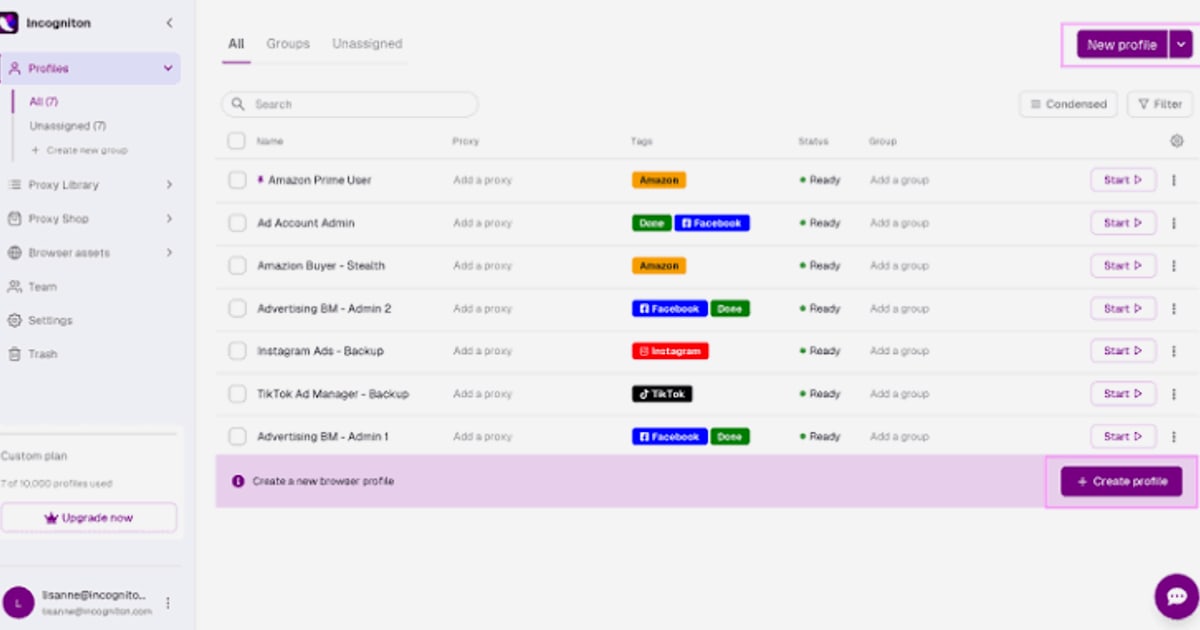
Because it supports mass profile actions, you can launch or stop multiple browser profiles simultaneously, making it efficient for bulk operations like applying cookies or logging into accounts.
Features Deep Dive
Incogniton Review 2025: Anti-Detect Browser Deep Dive product interface and feature overview.
Browser Fingerprint Spoofing
The core of any anti‑detect browser is its ability to create unique, convincing digital fingerprints. Incogniton lets you override or randomise parameters such as user agent, screen resolution, time zone, language, WebGL, canvas, and audio context. However, out‑of‑the‑box profile creation often leaves hardware‑level attributes exposed. During real‑world checks, default profiles sometimes fail popular testers like Pixelscan or Iphey unless the user manually tweaks advanced settings. This means you must understand fingerprinting concepts to fully mask your identity—not a plug‑and‑play experience.
If you need a guide on configuring fingerprints for undetectable automation, our AdsCrawl Fingerprint Settings: Anti-Detect Profile Guide walks through the parameters that matter most.
Profile Management and Isolation
Each profile in Incogniton is a completely separate browser environment with its own cache, cookies, and local storage. You can group profiles into folders, apply tags, and set team permissions—useful for agencies delegating accounts. The profile table is customisable, and mass actions like bulk launching or cookie importing are available.
Still, the interface feels dated. Adding a bookmark requires full URLs with https://, and installing extensions means manually copying Chrome Web Store links from another browser. The Synchronizer feature, which syncs profiles across devices, works only on Windows, leaving macOS users without easy cloud‑based continuity.
Proxy and Proxy Management
Incogniton supports HTTP, HTTPS, SOCKS5, and SSH proxies and integrates two proxy providers via API. You can also buy proxies from a built‑in shop. The free plan includes a free proxy, which is handy for initial testing.
That said, proxy configuration is one of the most cumbersome parts of the browser. Adding, assigning, and verifying a single proxy involves multiple steps and no interactive guidance. For users new to proxies, this can be a steep learning curve.
Team Collaboration and Permissions
For small teams, Incogniton offers role‑based access and the ability to share profiles. You can assign “Owner,” “Admin,” or “User” roles, and the folder structure helps keep projects organised. However, without a web or mobile version, remote team members are forced to install the desktop app—and macOS users miss out on the syncing feature entirely.
Setup and Getting Started
Installing Incogniton is straightforward. Download the app for Windows or macOS, create an account, and log in. On macOS, the app may trigger a Gatekeeper warning, which can be dismissed but raises security eyebrows.
Once inside, you’re greeted by a classic, dense UI. The documentation portal provides articles and videos, but there are no in‑app tooltips. New users receive a welcome email with basic guides, yet you’ll need to spend time learning the terminology and settings before launching your first safe profile. For a step‑by‑step approach to browser automation that complements Incogniton‑style setups, see our AdsCrawl API: Real Browser Automation for Data Extraction.
Strengths
- Truly free plan: Up to 10 profiles with core anti‑detect features and a free proxy. Ideal for beginners or low‑volume testing.
- Robust mass actions: Batch‑create, launch, and stop profiles; import cookies in bulk.
- Customisable fingerprints: Deep technical control for those who know how to use it.
- Team support: Basic role management and profile sharing, sufficient for small agencies.
Limitations and Drawbacks
- Outdated interface and raw UX: No modern redesign, confusing extension and bookmark handling, and many manual adjustments required.
- MacOS neglect: Synchronizer is Windows‑only; occasional security pop‑ups on macOS.
- Fingerprint leakage by default: Quick‑create profiles often fail hardware fingerprint tests; success demands manual configuration.
- No mobile fingerprints: Only Windows and macOS operating systems are available, which is a dealbreaker for mobile‑focused advertising.
- Limited support channels: Only Telegram and email; no live chat or active user community.
- Security incident history: A reported data leak in the past has led to crypto account compromises; compensation was not clearly communicated.
- Proxy complexity: Setting up and testing proxies is unnecessarily technical compared to competitors.
Pricing Signals
Incogniton’s free tier includes 10 profiles, a free proxy, and core fingerprinting capabilities. Paid plans scale based on the number of profiles and team features:
- Starter (€11.99/month): 50 profiles, basic team functions.
- Professional (€23.99/month): 150 profiles, advanced cookie management, extended team options.
- Enterprise (€47.99/month): 500 profiles, priority support, full collaboration.
Prices are competitive, especially for freelancers and small teams that don’t need hundreds of profiles. However, the value for money depends heavily on your technical comfort—less experienced users may waste hours configuring fingerprints and proxies.
Incogniton vs Alternatives: Decision Criteria
Incogniton Review 2025: Anti-Detect Browser Deep Dive product interface and feature overview.
When deciding whether Incogniton is right for you, weigh these factors:
- Technical skill: If you enjoy tweaking fingerprint paramateres manually, Incogniton rewards you with control. If you need one‑click, automatic masking, alternatives like GoLogin or AdsPower may be faster.
- Mobile fingerprints: If you run ads on mobile platforms, Incogniton’s lack of mobile fingerprints is a hard stop.
- Team location: Remote or cross‑platform teams will struggle without a web version or macOS sync.
- Budget: The free tier is genuinely useful for testing, but paid plans quickly outpace the support quality you might expect.
- Security expectations: The past data leak and macOS warnings should prompt you to enable two‑factor authentication and avoid managing sensitive crypto accounts.
For broader insights into browser automation and anti‑detect tools, the AdsCrawl Fingerprint Settings: Anti-Detect Profile Guide explores how different platforms approach fingerprinting.
User Reviews and Community Feedback
Public reviews on Trustpilot show a mix of satisfaction and frustration. Many users praise the free proxy and the overall idea: “I’ve been using this app for like 6 months and I very like it how it works and that provides free proxies so I can make several social media account.” Others, however, echo the usability complaints—pointing to an interface that hasn’t evolved and proxy setup that takes too long.
The GoLogin team’s detailed comparison highlights that Incogniton’s fingerprint detection failures at default settings and the absence of mobile fingerprints are significant pain points. While that review naturally promotes GoLogin, it mirrors the feedback found in niche forums: Incogniton is powerful in the right hands but a potential headache for newcomers.
Related reading
- Top 10 Generative AI and LLM Products (2026) - Discover the top 10 generative AI and large language model products of 2026, including ChatGPT, Claude, Gemini, and more. Expert review, criteria, and comparison.
- AdsCrawl Tutorial: Screenshots, HTML Extraction & Remote CDP - Step-by-step AdsCrawl tutorial: capture screenshots, extract HTML/Markdown, and control remote CDP sessions for web scraping and automation.
- Scrapfly API Documentation: Web Scraping, Cloud Browser & Screenshots - Comprehensive guide to Scrapfly's Web Scraping, Cloud Browser, and Screenshot API documentation. Learn setup, anti‑bot bypass, credit system, and how AdsCrawl fits browser automation workflows.
Sources and further reading
- Incogniton Browser: 2025 Review | Incogniton alternative - Considering Incogniton for work? We made the tests, counted the costs in 2025, compared it to GoLogin and made a comparison chart in the end!
FAQ
Is Incogniton free? Yes, the free plan gives you up to 10 browser profiles and a built‑in free proxy. It’s a genuine free starting point, not a time‑limited trial.
Does Incogniton work on Mac? Incogniton has a macOS application, but the Synchronizer feature (which syncs profiles across devices) is Windows‑only. macOS users also occasionally see security verification pop‑ups at launch.
What are the best alternatives to Incogniton? Popular alternatives include GoLogin, AdsPower, and Multilogin. They generally offer more modern interfaces, mobile fingerprint support, and web‑based profile access, though at varying price points.
Can Incogniton be used for web scraping? Yes, the browser’s profile isolation and proxy integration make it suitable for manual or simple automated scraping. For programmatic, large‑scale scraping, consider combining it with browser automation tools like AdsCrawl or Scrapfly.
Is Incogniton safe? No browser is completely immune to attacks. Incogniton had a security incident in the past where user data was compromised. It’s critical to enable two‑factor authentication and follow password best practices, especially if you handle sensitive accounts.
Conclusion: Should You Use Incogniton?
Incogniton remains a viable anti‑detect browser for technically inclined users who value deep manual control and a generous free tier. It handles multi‑account management reliably once configured correctly, and its mass‑action capabilities are a real time‑saver. However, the outdated interface, missing mobile fingerprints, macOS shortcomings, and the need for constant fingerprint tweaking mean it isn’t the best fit for everyone.
If you’re an affiliate marketer or social media manager willing to invest time in learning the tool, Incogniton can serve you well without straining your budget. But if you need a plug‑and‑play experience with mobile support and seamless cross‑device sync, exploring alternatives is wise. At AdsCrawl, we help professionals evaluate tools like Incogniton to make informed choices for multi‑account management, browser automation, and data collection.