
Website Change Alerts: How to Monitor Any Page (2026)
Learn how website change alerts work, compare visual vs text vs API monitoring, and build a reliable alerting workflow with practical examples.
Website Change Alerts: How to Monitor Any Page (2026)
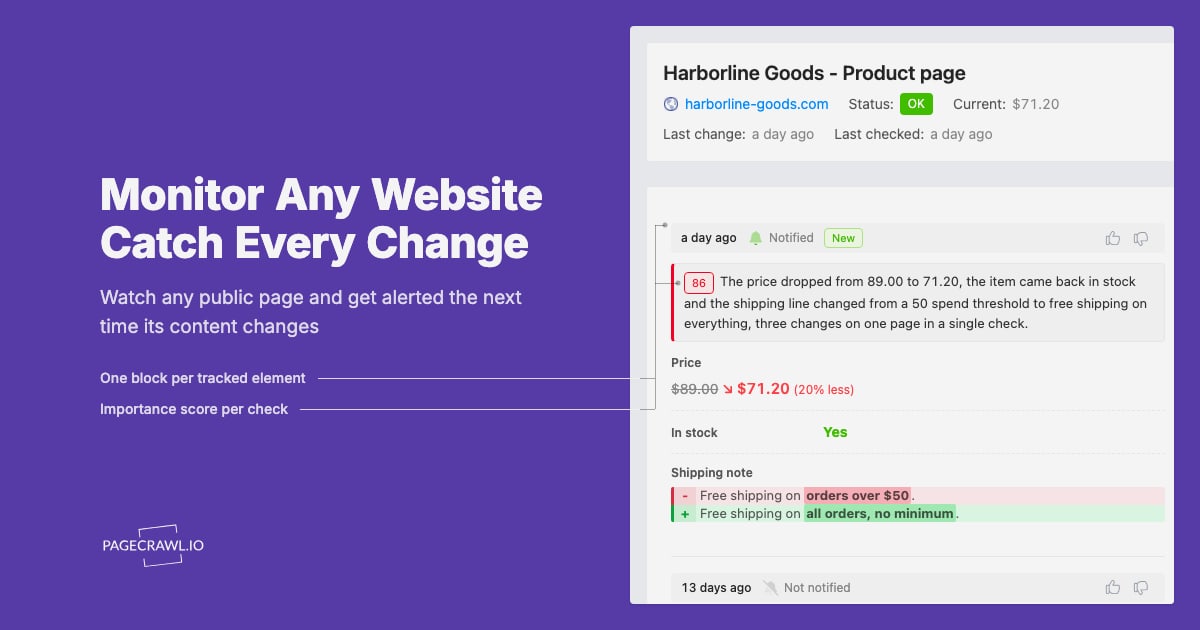
A website change alert notifies you the moment a page you care about is updated — a price drop, a restock, a new policy clause, or a competitor's feature list. Instead of refreshing tabs, you define what to watch and let a monitor do the checking. This guide explains how change alerts work, compares the main approaches, and shows how to build a reliable workflow for personal and business use.
What website change alerts actually do
Website Change Alerts: How to Monitor Any Page (2026) - What website change alerts actually do.
At its core, a change monitor runs a loop:
- Fetch the target page on a schedule.
- Extract the part you care about (full page, a region, or a CSS selector).
- Compare the new version against the last known version.
- Notify you when the difference crosses your threshold.
The quality of an alert depends on how well each step is handled. A monitor that captures the whole page will flag rotating ads and timestamps as "changes." A monitor that targets a price element will only ping you when the number moves.
Visual vs text vs API monitoring
Website Change Alerts: How to Monitor Any Page (2026) - Visual vs text vs API monitoring.
There are three common ways to detect changes, and they suit different jobs.
Visual monitoring
Visual monitoring takes screenshots and compares pixels or regions. It is the easiest to set up — paste a URL, highlight an area, and you are done. It also catches layout and design changes that text extraction misses. The trade-off is noise: dynamic banners, carousels, and cookie notices can trigger false positives unless you scope the region carefully.
Text and DOM monitoring
Text monitoring extracts HTML or Markdown and diffs the content. It is precise for structured pages like pricing tables, documentation, and regulatory filings. You can target a CSS selector to ignore everything outside the element you care about. This approach is lighter than full rendering but can miss changes that only appear after JavaScript runs.
API and headless browser monitoring
For pages that render client-side, an API-driven approach gives you the most control. You can load the page in a real browser, wait for the content to settle, extract HTML or Markdown, and capture a screenshot for evidence. This is where browser automation platforms fit: they let you script the fetch, validate the rendered state, and pipe the result into your own alerting logic.
How to choose the right monitoring approach

Website Change Alerts: How to Monitor Any Page (2026) - How to choose the right monitoring approach.
| Approach | Best for | Watch out for |
|---|---|---|
| Visual | Design changes, region-specific tracking, non-technical users | False positives from dynamic elements |
| Text/DOM | Pricing, docs, compliance text, structured data | Misses JS-rendered content |
| API/headless | JS-heavy pages, custom logic, scale, evidence capture | Requires setup and maintenance |
If you only need a handful of pages and want zero code, a visual tool is usually enough. If you are tracking dozens or hundreds of pages, need custom diff logic, or want to feed changes into another system, an API-based workflow pays off quickly.
Practical examples
Website Change Alerts: How to Monitor Any Page (2026) - Practical examples.
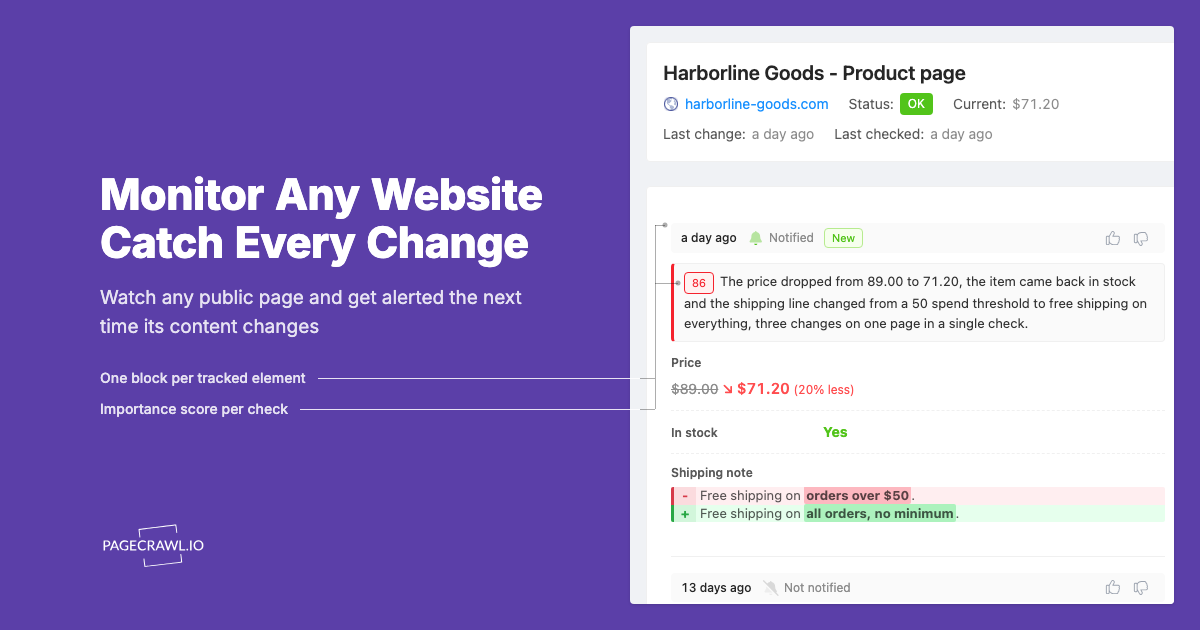
Price drop and restock alerts
A common personal use case is tracking a product page. Point the monitor at the price element or stock status, set a check interval, and route alerts to email or a messaging app. The key is scoping: monitor the price box, not the whole page, so recommendations and ads do not trigger noise.
Competitor and market monitoring
Teams track competitor pricing pages, feature lists, and press releases. A text or DOM monitor works well here because the content is usually static. For pages that load pricing via JavaScript, a headless browser step ensures you capture the final rendered values rather than an empty shell.
Compliance and documentation tracking
Regulatory and partner sites update critical documents without fanfare. Monitoring the specific section — a terms page, a filing list, a policy PDF — gives you an audit trail. Capturing a screenshot alongside the extracted text creates evidence you can review later.
Building a custom alert pipeline
If you want full control, the workflow looks like this:
- Schedule a job that loads the target URL in a browser session.
- Wait for the relevant selector to appear.
- Extract HTML or Markdown and, optionally, a screenshot.
- Diff against the previous snapshot.
- Send an alert only when the diff exceeds a threshold.
AdsCrawl fits naturally into steps 1–3. It provides cloud browser sessions with fingerprint profiles, concurrent execution, and a unified API for screenshots and HTML/Markdown extraction. You can trigger a session via cURL, Node.js, or Python, capture the rendered page, and hand the output to your own diff and notification layer. This keeps the monitoring logic in your code while the browser infrastructure stays managed. For a broader look at tooling, see our comparison of top website change detection and monitoring software, and if you are weighing API options, AdsCrawl vs Browse AI vs Puppeteer breaks down the differences.
Reducing false positives
Noise is the biggest reason people abandon change alerts. A few habits help:
- Scope tightly. Monitor a selector or region, not the whole page.
- Ignore volatile elements. Strip timestamps, view counters, and ad slots before diffing.
- Set thresholds. Require a minimum percentage change before alerting.
- Use rendering waits. For JS-heavy pages, wait for the target element before capturing.
- Batch alerts. Group changes into a digest instead of one message per pixel shift.
Delivery channels and alert routing
Where alerts land matters as much as when they fire. Email is the default for most tools. SMS and Slack or Teams webhooks are common for time-sensitive cases like restocks. APIs let you push changes into a ticketing system, a data warehouse, or a custom dashboard. If you are already running observability tooling, routing change alerts through the same pipeline can keep everything in one place — see our roundup of developer monitoring and observability tools for context.
Related reading
- How to Use AdsCrawl with Price API for E-commerce Data - Combine AdsCrawl browser automation with Price API e-commerce data to verify product pages, capture screenshots, and build reliable pricing workflows.
- AdsCrawl vs ScreenshotEngine: Browser API Comparison 2026 - Compare AdsCrawl and ScreenshotEngine for screenshots, HTML extraction, and browser automation. See which API fits your workflow in 2026.
Sources and further reading
- Need help finding a free tool to monitor specific website changes - Jul 26, 2024 ... Visualping.io - Same with changedetection, it also has a free version and it even keeps tabs on the website updates and sends alerts. I wonder ...
FAQ
What is a website change alert?
It is a notification triggered when a monitored web page or page section differs from its previous state. Alerts can arrive via email, SMS, chat, or API.
How often should I check for changes?
Match the interval to the stakes. Restocks and flash sales may need checks every few minutes; policy pages might only need daily or weekly checks. More frequent checks cost more resources and can increase noise.
Can I monitor only part of a page?
Yes. Most tools let you select a region visually or target a CSS selector. Scoping is the single most effective way to cut false positives.
Do I need coding skills?
Not for basic visual monitoring — paste a URL and highlight an area. Coding helps when you need custom diff logic, JS-rendered pages, or integration with other systems.
Are website change alerts legal?
Monitoring publicly accessible pages is generally fine, but you should respect terms of service, robots directives, and rate limits. Avoid accessing private or authenticated content without permission.
Conclusion
Website change alerts turn a manual, error-prone habit into an automated signal. Start by defining what actually matters — a price, a stock status, a clause — and scope your monitor to that element. For simple cases, a visual tool is enough. For scale, JS-heavy pages, or custom workflows, an API-driven approach with a real browser gives you the control and evidence you need. Pick the approach that matches your volume and technical comfort, then tune thresholds until the alerts you get are the ones you want.
Sources: Visualping, UptimeRobot website change detection tool